stevehopwoodforex.com
https://www.stevehopwoodforex.com/phpBB3/
Print view

Zorro
https://www.stevehopwoodforex.com/phpBB3/viewtopic.php?t=921
Page 8 of 12
Author:  idempotent [ Mon Jun 03, 2013 12:22 pm ]
Post subject:  Re: Zorro

I denegrated Zorro a little here: http://www.stevehopwoodforex.com/phpBB3 ... 797#p63797 and JCL responded politely. So I'll continue the conversation here.

I tried Zorro on demo, starting around 28 May 14:00 GMT. I'm using the FXCM demo, and wanted to leave it run and do its thing and prove itself in forward testing before I bought the sponsor version.

I find that the client logs me out after a few hours, as below.
zorro-logout.png
And then I find I cannot log back in until I restart Zorro. Atempting to connect again b pressing "Trade" causes this:
zorro-fail-restart.png
I blindly assume it's not a broker issue? I would have thought the client would stay connected, but just receive no ticks. It's also happened during market times, though I have no concrete details.

I am running it on Windows 7 (and recently updated and rebooted it), and with non-Administrator privileges.

JCL, any clues?
Author:  jcl [ Mon Jun 03, 2013 1:16 pm ]
Post subject:  Re: Zorro

There's indeed something wrong, related to the server connection. It's not a FXCM issue - we have about 20 Zorros trading here with FXCM and they show nothing unusual today at 00:19 UTC. Also, other users had complained long since when the FXCM connection had broken down today morning.

First, make sure that the Zorro installation is ok - if in doubt, install it again in the same folder. Then start Zorro again, but with command line option -diag. You can give a command line option by starting Zorro from the command window or with a shortcut. Start trading, wait until something bad happens - connection breaks down, or a crash - then close Zorro. You'll find a text file "diag.txt" in the Log folder. Please post its content here - it will give some hints what happened.
Author:  jcl [ Mon Jun 03, 2013 5:14 pm ]
Post subject:  Re: editor

hilavoku wrote:Hi jcl,

is there a way to check the syntax or compile the code within the editor itself? For example, can i bind some function keys to run zorro with the appropriate command line?

thx in advance

PS: When do you think there will be the debugging features be ready?
Both features are connected, as the debugger who can compile and run code is part of the editor. When the features are ready is hard to tell, it depends on user demand. The more people request that on the user forum, the earlier it will be implemented. Although the debugger already exists, it's not a fast to implement feature because a large part of the Zorro core has to move from the Zorro window to the editor.
Author:  idempotent [ Mon Jun 03, 2013 10:48 pm ]
Post subject:  Re: Zorro

jcl wrote:First, make sure that the Zorro installation is ok - if in doubt, install it again in the same folder. Then start Zorro again, but with command line option -diag. You can give a command line option by starting Zorro from the command window or with a shortcut. Start trading, wait until something bad happens - connection breaks down, or a crash - then close Zorro. You'll find a text file "diag.txt" in the Log folder. Please post its content here - it will give some hints what happened.
Thanks, am running it in diagnostic mode now.

Is there a legitimate way to run both Z1 and Z2 on demo accounts at the same time? Your licensing terms seem to forbid it (though most other restrictions on demo are relaxed). It would speed up my forward testing if you were to allow this.

Thanks
Author:  idempotent [ Tue Jun 04, 2013 3:37 am ]
Post subject:  Re: Zorro

jcl wrote:First, make sure that the Zorro installation is ok - if in doubt, install it again in the same folder. Then start Zorro again, but with command line option -diag. You can give a command line option by starting Zorro from the command window or with a shortcut. Start trading, wait until something bad happens - connection breaks down, or a crash - then close Zorro. You'll find a text file "diag.txt" in the Log folder. Please post its content here - it will give some hints what happened.
It logged me out again, but there is no diag.txt file in the Log directory, nor in the directory I ran it from. I am trying it again on a copy running on my Desktop folder, in case it's a file permission thing.

I don't need to run it as administrator do I (hope not!)
Author:  idempotent [ Tue Jun 04, 2013 5:27 am ]
Post subject:  Re: Zorro

idempotent wrote:It logged me out again, but there is no diag.txt file in the Log directory, nor in the directory I ran it from. I am trying it again on a copy running on my Desktop folder, in case it's a file permission thing.

I don't need to run it as administrator do I (hope not!)
OK, more info. I use a virtual desktop manager called Dexpot. I can have Zorro sitting off on one virtual desktop, and leave it there, while doing work on another desktop.

It appears that Zorro doesn't like being unminimised and me switching away to another window. It now asks me if I want to close all trades, and it logs out. Restarting presents the same 'Crash in script' popup until I restart.

In I minimise before I switch away, it remains connected. Weird.

Maybe Dexpot sends some weird event to each present application as it switches away. Or maybe Zorro is hooked into something related to desktop events, and gets confused when I switch away.

JCL, any clues?
Author:  jcl [ Tue Jun 04, 2013 7:33 am ]
Post subject:  Re: Zorro

Zorro only asks to close all trades when the user manually clicks on the "Stop" button. It can not happen by unminimizing, unless something is seriously messed up. Maybe Dexpot hooks itself into the message loop or something like that. If Zorro won't run properly with Dexpot, other programs will most likely have the same problem.

I need the diag.txt for seeing which module crashed. If you succeeded to start the program with '-diag' command line option, you'll also get the message "diagnostics mode" at startup. Are you familiar with command line options? Otherwise I could describe the process step by step.

For determining if the problem is caused by Dexpot, can you run Zorro on your normal desktop?
Author:  idempotent [ Tue Jun 04, 2013 10:40 am ]
Post subject:  Re: Zorro

jcl wrote:Zorro only asks to close all trades when the user manually clicks on the "Stop" button
It's not a focus thing - it happens if I leave the focus on the Help button too. It also happens if the Zorro app is not in the foreground. Seems to happen simply if the window is unminimised, and in Trade mode.
jcl wrote:I need the diag.txt for seeing which module crashed.
Sorry, I had it, but it looked uninteresting so I forgot about it. It's attached now.
jcl wrote:For determining if the problem is caused by Dexpot, can you run Zorro on your normal desktop?
Seems to run OK.

Another interesting symptom: when I switch away, and Zorro wants to close, it asks if I want to close all trades, but not if I want to stop trading, which happens when I press Stop. Also a Start after a normal Stop work, whereas I was getting the Crash in Script after a "Dexpot" incident.

Thanks for your attention. It's obviously a corner case, but I appreciate you looking into it.
Author:  jcl [ Tue Jun 04, 2013 12:42 pm ]
Post subject:  Re: Zorro

Thanks for the diag file - and indeed, anything's normal, no crash or lost connection. The problem seems to be that something in Dexpot triggers the message queue or button events, which then causes all sorts of subsequent problems. I'll forward this to the developers and they probably will install a Dexpot copy and check what happens. Thanks for your help!

BTW, the question to stop trading only comes when you click [Stop], but not when Zorro closes - after closing it can not continue trading anyway.
Author:  jcl [ Wed Jul 03, 2013 6:09 pm ]
Post subject:  Re: Zorro

Again, a new version can be downloaded from the Zorro page. Zorro 1.12 got the following new features:

- Slippage is now recorded while live trading, and displayed in the performance report in total and per trade.

- The plotMAEGraph function can produce MAE distribution graphs and similar charts.

- The plotGraph function draws lines and polygons in a chart.

- The DOT type can be used for plotting a dotted curve.

- The Trail distance can now be negative for raising the stop loss on any bar regardless if the trade is in profit or not.

- Due to an internal loop optimization, trades are now entered faster, thus reducing slippage.

- The MUTE flag prevents playing sounds (in the case that Zorro trades from your bedroom).

- NumTotalCycles can be used to repeat a full simulation cycle many times.

- The pattern analyzer can now generate 'fuzzy pattesrns' with the FUZZY|PATTERN method.

- The pattern analyzer can now generate pattern finding functions in C that can be exported to other platforms.

- The equalF and eq functions have been added to the fuzzy logic set.

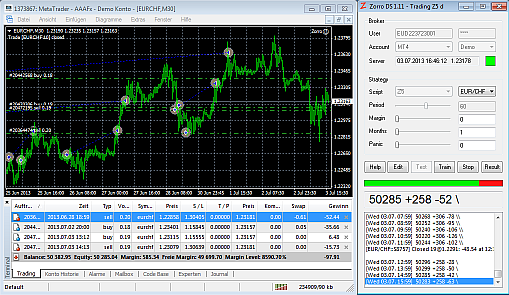
Here's an image of the latest Zorro version, attached to a Empty4 instance:
Image
All times are UTC Page 8 of 12